 Garden
Affiliate Disclosure
Some links on this page are affiliate links. As an Amazon Associate, we earn from qualifying purchases — at no extra cost to you. We do not buy, test, or physically handle the products we cover; our rankings come from aggregated owner reviews, ratings and expert consensus. Commissions never change our verdicts. How we rank · full disclosure.
The one thing this page ranks on: where the light does not go. Screen eye strain comes from glare on the display and from a bright monitor sitting in a dim room, and any conventional lamp bright enough to fix the second problem creates the first. Only asymmetric bar optics solve both, which is why the top three picks here are monitor light bars and our #1 is the BenQ ScreenBar Halo.
That criterion is why this is not our best desk lamp roundup in a different order. There, coverage and value decide it and a wide-panel lamp wins by lighting a surface beautifully — and that same lamp sits in your peripheral vision and reflects off a monitor, so it is absent here entirely. For color choices generally see 2700K vs 3000K lighting, and the indoor lighting hub for the rest of the room.
Top Picks at a Glance
Our #1 Pick: BenQ ScreenBar Halo
The problem with lighting a desk you work at a screen on is that the two things you want are in direct conflict. Your eyes need the area around the monitor to be reasonably bright, because a luminous rectangle in a dark room makes your pupils contract for the screen and dilate for everything else, over and over, for hours — that constant readjustment is a large part of what people experience as tired eyes. But any lamp bright enough to raise the ambient level also throws light onto the display, and OSHA notes that bright light hitting a screen washes out images and contributes to eye fatigue, so a reflection on the glass is worse than the darkness you were trying to fix.
A monitor light bar resolves it with optics rather than brightness. The bar sits on top of the screen and its reflector is asymmetric, so the beam is thrown forward and down onto the desk and the keyboard, with a sharp cut-off that keeps light off the panel behind it. You get a well-lit work surface and a screen with nothing on it. The Halo adds the second half: a rear-facing backlight that washes the wall behind the monitor, which lifts the darkest part of your field of view and directly attacks the contrast problem rather than working around it.
The supporting details are the ones that matter for eye comfort rather than specification sheets. An ambient sensor auto-dims the bar to the room, so the balance stays right as daylight fades instead of the lamp becoming the new bright spot at 6pm. Color temperature runs 2700K to 6500K, so you can work neutral by day and warm in the evening. The driver is flicker-free. And it draws power from the monitor's USB and occupies no desk space at all, which on a small desk is worth more than it sounds.
The honest limitations: it lights the area in front of the monitor and nothing else, so it is not a room light, a craft light or a reading light for an armchair. It needs a monitor with a compatible top edge — very thick or heavily curved panels can be awkward. At around $180 it is dear, and the ScreenBar Plus below has the same optics for less. And no lamp fixes a screen that is too bright: turn the monitor down first, then light the room to meet it.
Check price on Amazon → (paid link)
The Ranked Field

Best for putting light on the desk and none at all on the screen
- Asymmetric optics throw light forward, not at the monitor
- Rear backlight raises the wall behind the screen
- Auto-dims to match ambient room level
- Adjustable 2700K to 6500K, flicker-free driver
Why buy it: screen eye strain is a contrast problem before it is a brightness one, and this is the only design here that lights the desk, lifts the wall behind the monitor, and puts nothing on the glass.

Best for the same optics without the backlight, at a lower price
- Same asymmetric no-glare optics as the Halo
- Desktop dial for brightness and color temperature
- Auto-dimming to ambient light
- Powered from the monitor USB, zero desk footprint
Why buy it: the optics are the part that stops glare, and they are identical here — you give up the wall backlight and a wireless controller, not the mechanism that spares your eyes.

Best for no-glare desk lighting for the price of a decent lamp
- Asymmetric bar optics that keep light off the screen
- Auto-dimming sensor for ambient matching
- Adjustable brightness and color temperature
- Clips to the monitor, frees the whole desk
Why buy it: it does the one thing that matters — light the desk without reflecting off the screen — for a quarter of the price, which puts it ahead of every conventional lamp on this page.

Best for reading paper and detail work rather than screen sessions
- ClearSun LEDs tuned for high visual clarity
- Three color temperature modes
- Diffused head with limited hotspot
- Wireless phone charging in the base
Why buy it: if your strain comes from small print rather than a monitor, contrast on the page is what matters and this renders detail clearly enough that your eyes stop working to resolve it.
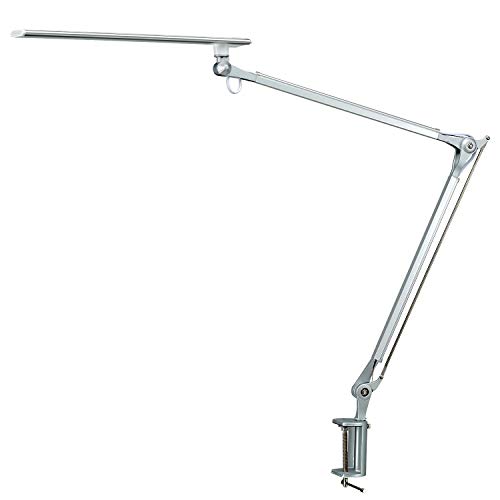
Best for getting the source above and behind your line of sight
- Long swing arm places the head out of your eyeline
- Clamp mount frees the entire desk surface
- Four color modes and five brightness levels
- Flicker-free with a diffused shade
Why buy it: a lamp is only glare-free if the bulb is not in your field of view, and the reach of this arm is what lets you put the head where a fixed-base lamp never can.

Best for a flicker-free, dimmable lamp when a bar will not fit your setup
- Flicker-free LED with 5 modes and 7 brightness levels
- Touch dimming down to a genuinely low level
- Adjustable head and arm
- USB charging port in the base
Why buy it: the important feature at this price is that it dims low enough to match a dim room, because a lamp stuck at full brightness in the evening causes the contrast it was bought to prevent.
Quick Comparison
| Product | Best for | Rating | Price | Buy |
|---|---|---|---|---|
| BenQ ScreenBar Halo LED Monitor Light Bar with Wireless Controller and Backlight | Best Overall for Eye Strain | — | Check (paid link) | |
| BenQ ScreenBar Plus e-Reading LED Computer Monitor Light Bar with Desktop Dial | Best Value Light Bar | — | Check (paid link) | |
| Quntis Computer Monitor Lamp, Screen Monitor Light Bar with Auto-Dimming | Best Budget Light Bar | — | Check (paid link) | |
| OttLite LED Table Lamp with Wireless Charging and USB, ClearSun LEDs | Best Conventional Lamp | — | Check (paid link) | |
| PHIVE CL-1 Architect Desk Lamp, LED Clamp on Desk Light with Metal Swing Arm | Best Task Positioning | — | Check (paid link) | |
| Consciot LED Desk Lamp 12W with USB Charging Port and 5 Lighting Modes | Best Value | — | Check (paid link) |
How We Rank for This Use Case
We do not buy, test or physically handle these lamps. For eye strain we rank on four properties in this order. Where the light goes — whether any of it reaches the screen, and whether the source itself sits in your field of view. Dimming range, because a lamp that will not go low creates contrast in a dim room instead of relieving it, and auto-dimming to ambient is better still. Flicker-free driving, since invisible flicker fatigues the eye whether or not you can perceive it. Adjustable color temperature, for matching the hour. Raw output is not a ranking factor and chasing lumens is usually the wrong instinct here. Those judgements sit on aggregated owner ratings weighted by review volume and on the complaints that repeat — visible flicker, hotspots, buzzing at low dim, and weak dimming floors. Prices were current at the time of writing. Full method on how we rank.
The Six, Reviewed for Eye Comfort
1. BenQ ScreenBar Halo — Best Overall for Eye Strain
Covered above. What owners praise: zero screen glare, the backlight that removes the dark halo around the monitor, auto-dimming that means they stop thinking about it, and the desk space it gives back. What owners complain about: price, that it only lights the front-of-monitor area, and fit on thick or curved panels. First because it is the only product here that treats contrast and glare as the same problem.
2. BenQ ScreenBar Plus — Best Value Light Bar
The same asymmetric optics for around fifty dollars less, which on this page is the part that matters — the mechanism that keeps light off the screen is identical. What you give up is the rear backlight and the wireless controller, replaced by a weighted desktop dial that many owners actually prefer for brightness and color temperature because it is always in the same place. Auto-dimming is retained. What owners complain about: a cable to the dial adding clutter, and no wall backlight, which matters most if your monitor sits against a dark wall.
3. Quntis Monitor Light Bar — Best Budget Light Bar
Third, ahead of every conventional lamp here, and the reason is purely the criterion: it does the one thing that decides screen eye comfort. Asymmetric optics keep the light off the panel, an auto-dimming sensor matches the room, and brightness and color temperature adjust. For around fifty dollars, that is more eye-strain relief per pound than any desk lamp at the same price can deliver, because a desk lamp is solving a different problem. What owners complain about: build that feels lighter than the BenQ bars, a hinge that needs a firm set on some monitors, and a narrower beam on very wide screens.
4. OttLite ClearSun LED Table Lamp — Best Conventional Lamp
The best answer here if your strain is coming from paper rather than a screen — small print, handwriting, needlework, model-making. A light bar throws light onto the desk in front of the monitor and nowhere else, which is no help at all for reading in an armchair or working at the far side of a table. OttLite tunes its LEDs for visual clarity, and the practical effect is that fine detail resolves without your eyes working to separate it. Three color modes cover day and evening, and there is wireless charging in the base. What owners complain about: price against basic lamps, a limited head range, and a footprint that a light bar does not have.
5. PHIVE CL-1 Architect Lamp — Best Task Positioning
The important thing an architect lamp buys you is not brightness, it is placement. A lamp only produces glare if the source is in your field of view or bouncing off what you are looking at, and a long swing arm lets you put the head high and to the side, above the eyeline and out of the reflection path. The clamp mount frees the whole desk. Flicker-free with four color modes and five brightness levels. What owners complain about: a clamp that needs a suitable desk edge and about an inch of thickness, and an arm that will drift over months if the tension screws are not kept snug.
6. Consciot 12W LED Desk Lamp — Best Value
The cheapest sensible option if a bar will not work on your setup — a laptop, a wall-mounted display, a shared desk. What earns it the place is not the five color modes but the dimming floor: it goes genuinely low, which matters because a lamp that only reaches half brightness at its minimum becomes the new bright spot in a dim evening room and reintroduces the exact contrast you were avoiding. Flicker-free, adjustable head, USB port. What owners complain about: a small light footprint that suits a laptop rather than a full desk, and plastic build.
What Owners Actually Complain About
The eye-strain complaints about lighting are consistent and each maps onto a ranking factor. Glare on the screen is the one this page exists to solve, and it is a geometry problem — no amount of dimming a badly placed lamp fixes a reflection. Visible or subtle flicker fatigues the eyes even when you cannot consciously see it, so buy a lamp explicitly rated flicker-free, as all six here are. Buzzing at low dim points to a cheap driver and tends to arrive with the cheapest lamps. And a lamp that will not dim low enough is the quiet failure: in a dim room it becomes the bright object your eyes keep adjusting to, which is the same contrast problem in a different costume. If a lamp buzzes, our guide on why LED lights buzz explains the cause.
Setting Up a Desk to Spare Your Eyes
The hardware is half of it. Turn the monitor brightness down first — most screens ship far brighter than a room needs, and lighting the room to match a screen at maximum is fighting the wrong battle. Then raise the ambient level around the screen so the display is not an island of light: a bar with a backlight does this directly, a bounced lamp against a wall does it adequately. Put any conventional lamp to the side opposite your writing hand, high enough that the bulb is out of your eyeline, and follow OSHA's workplace guidance to position it so nothing reflects off the monitor. Run 4000K to 4500K by day and warmer in the evening. And follow the 20-20-20 rule: every 20 minutes look at something 20 feet away for 20 seconds, which relaxes the focusing muscles that no lamp can rest for you.
The Verdict
Ranked on where the light does not go, the BenQ ScreenBar Halo is our pick, because it lights the desk, lifts the wall behind the monitor and puts nothing on the glass. The ScreenBar Plus has the identical optics for less, and the Quntis bar delivers the same principle for around fifty dollars — which is why all three outrank the conventional lamps on this page. If your strain comes from paper rather than a screen, the OttLite is the right tool instead. Turn the monitor down first, dim the lamp to match the room, and take the 20-20-20 breaks. Check price on Amazon → (paid link)