 Garden
Affiliate Disclosure
Some links on this page are affiliate links. As an Amazon Associate, we earn from qualifying purchases — at no extra cost to you. We do not buy, test, or physically handle the products we cover; our rankings come from aggregated owner reviews, ratings and expert consensus. Commissions never change our verdicts. How we rank · full disclosure.
The short version: the best video doorbell without a subscription is the eufy Video Doorbell E340. It records everything to local storage with no monthly fee, runs person detection on the device itself, and adds a second downward-facing camera that watches your doorstep for packages — a genuine flagship with zero ongoing cost. For sharp video on a budget, the TP-Link Tapo D230 saves free 2K clips to a microSD card, and the Blink Video Doorbell is the cheapest local-storage option when paired with a Sync Module 2. The one thing to check before you buy: make sure recordings save locally, because a cloud-only doorbell needs a paid plan to keep any video at all.
Avoiding a subscription comes down to local storage, so the picks below are the doorbells that let you keep your footage for free — and we flag the ones, like Ring, where you cannot. For the full field see our best video doorbell roundup, the subscription question is explored in using a security camera without a subscription, and the smart home and security hub ties it together.
Top Picks at a Glance
Our #1 Pick: eufy Video Doorbell E340
The E340 is the doorbell that proves you do not have to pay a monthly fee to get a premium experience. It records every event to local storage — on the device or a eufy HomeBase — with no subscription, and it does the smart work, person detection and alerts, on the device rather than in a paywalled cloud. The standout hardware feature is the dual camera: a main camera at head height plus a second lens angled down at the doorstep, so you see both the visitor’s face and any package left on the ground, which single-camera doorbells miss.
The video is a sharp 2K with color night vision, it installs wired or on battery, and because the footage lives in your home it stays private and keeps working if your internet hiccups. At around $150 it is priced like a mid-range doorbell but behaves like a flagship, and over a couple of years the saved subscription fees more than cover the hardware.
Consensus Score ████████░░ 8.7 — built from an average of 4.5 stars across thousands of verified owner ratings.
The honest weaknesses: eufy does offer optional cloud plans, which some buyers find muddies the no-fee message, and a thief could take a doorbell that stores only on-device — using the HomeBase for storage avoids that. Setup with existing chimes can also take a little patience.
Check price on Amazon → (paid link)
The Ranked Field

Best for local recording with no monthly fee and a package camera
- Records locally, no subscription required
- Dual cameras show face and packages
- 2K resolution with color night vision
- On-device AI person detection
Why buy it: it records everything to local storage for free, and the second downward camera watches your doorstep for packages — a genuine no-fee flagship.

Best for sharp 2K video saved to a microSD card for free
- Free local storage via microSD
- 2K HD with head-to-toe view
- Included plug-in chime
- Battery or wired install
Why buy it: crisp 2K video stored free on a microSD card, an included chime, and a low price make it the value champion of no-subscription doorbells.
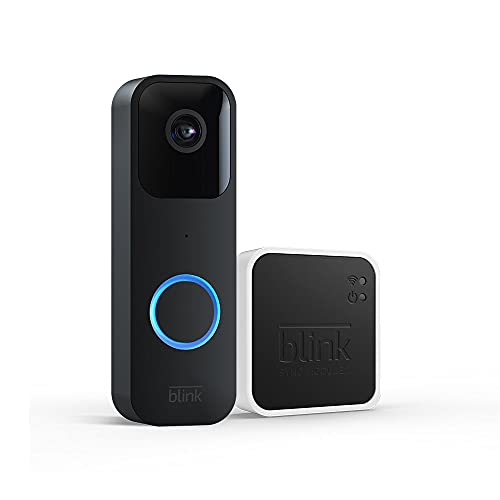
Best for the cheapest local-storage doorbell in the Amazon ecosystem
- Local storage via Sync Module 2 and USB drive
- Two-year battery life on AA cells
- Two-way audio and motion alerts
- Alexa integration
Why buy it: pair it with the Sync Module 2 and a USB drive and it stores clips locally for free, at a price nothing else here undercuts.

Best for smart alerts with a rolling free event history
- 3 hours of free event video history
- On-device person, package and animal alerts
- Works wired or on battery
- Google Home integration
Why buy it: even without a subscription it keeps a rolling 3-hour event history and does smart alerts on-device, so casual users may never need to pay.

Best for top Ring hardware if you later want live-only use
- Head-to-toe HD+ video with 3D motion
- Live view and two-way talk without a plan
- Bird’s Eye radar motion
- Alexa integration
Why buy it: the best Ring hardware still gives you live view and real-time answering with no plan — just know Ring needs a subscription to save recordings, so weigh it carefully.

Quick Comparison
| Product | Best for | Rating | Price | Buy |
|---|---|---|---|---|
| eufy Security Video Doorbell E340 with Dual Cameras | Best Overall No-Sub | — | Check (paid link) | |
| TP-Link Tapo D230S1 2K Video Doorbell with Chime | Best 2K No-Sub | — | Check (paid link) | |
| Blink Video Doorbell with Sync Module 2 | Best Cheap No-Sub | — | Check (paid link) | |
| Google Nest Doorbell (Battery), Ash | Best Free Cloud Window | — | Check (paid link) | |
| Ring Battery Doorbell Pro with 3D Motion Detection | Best Premium No-Sub Option | — | Check (paid link) |
How We Rank
We do not buy, test or physically handle these doorbells. For no-subscription use we weight whether recordings genuinely save locally for free, storage method and privacy, video quality and smart alerts that work without a plan, and installation flexibility, plus aggregated owner ratings weighted by review volume and recurring complaints such as Wi-Fi drops, motion-alert lag and forced cloud plans. Prices were current at the time of writing. Full method on how we rank.
The No-Subscription Doorbells, Reviewed
1. eufy Video Doorbell E340 — Best Overall No-Sub
Covered above. What owners praise: free local recording, the dual package-watching camera, sharp 2K, and on-device detection. What owners complain about: optional cloud plans muddy the message, and on-device-only storage is theft-vulnerable without the HomeBase. The no-fee flagship.
2. TP-Link Tapo D230 — Best 2K No-Sub
Crisp 2K video saved free to a microSD card, an included plug-in chime, and a low price make it the value champion. What owners praise: the picture quality, free local storage, and the bundled chime. What owners complain about: the app is less polished than the big brands and you supply the microSD card. The best value in no-subscription doorbells.
3. Blink Video Doorbell — Best Cheap No-Sub
Paired with a Sync Module 2 and a USB drive, it stores clips locally for free at a price nothing here undercuts, and its AA batteries last around two years. What owners praise: the low cost, long battery life, and Alexa fit. What owners complain about: you must buy the Sync Module for local storage, and video is 1080p, not 2K. The cheapest route to local recording.
4. Google Nest Doorbell (Battery) — Best Free Cloud Window
Unusually generous for a cloud brand: it keeps a rolling 3-hour free event history and does person, package and animal alerts on-device, so casual users may never pay. What owners praise: the smart on-device alerts and the free history window. What owners complain about: only 3 hours without Nest Aware and no local storage. A strong pick if you are in the Google ecosystem and want minimal fuss.
5. Ring Battery Doorbell Pro — Best Premium No-Sub Option
The best Ring hardware gives you live view and two-way talk with no plan, but — and this is the catch — Ring saves recordings only in the cloud, so keeping any video requires a Ring Home subscription. That's the same cloud video system that was the subject of a 2023 FTC enforcement action over employee access to customer footage and weak account security, settled with $5.8 million earmarked for customer refunds. What owners praise: the excellent camera, 3D motion, and radar features. What owners complain about: no saved recordings without a plan, which undercuts the whole no-subscription goal. Buy it only if you truly want live-only use or accept the fee.

What Owners Actually Complain About
Three themes recur. Discovering the fee too late is the big one, and it is almost always a Ring or cloud-only doorbell — buyers assume any doorbell saves video, then learn recordings need a plan; the fix is to confirm local storage before purchase. Wi-Fi reliability at the door trips up every brand, because a doorbell sits at the edge of the network; a mesh node or extender near the door solves most alert-lag and stream complaints. And theft of on-device footage worries owners of local-only doorbells — choosing a model that backs up to a separate hub, like eufy’s HomeBase, removes the risk. Installation help is in how to install a video doorbell, and connection drops in why a Wi-Fi camera keeps disconnecting.
Local vs Cloud: What You Actually Give Up
The no-subscription decision is really a storage decision. Local storage — a microSD card, a USB drive, or a hub — costs nothing ongoing, keeps footage private in your home, and records even if the internet drops. Its weaknesses are that you manage the storage and that on-device footage could leave with a stolen doorbell, which a separate hub prevents. Cloud storage survives theft and is reachable from anywhere, but it charges a monthly fee and puts your video on a company’s servers. For most households the local route is the better value and the more private choice, which is why our top three all record locally. If you want cloud convenience without a fee, the Nest’s free 3-hour window is the middle path. One more thing every doorbell here shares: two-way talk means recording audio, and audio recording law is state-specific — most states allow it with one party's consent, but around a dozen require everyone on the call to agree, so check your own state before relying on a clip as evidence.
The Verdict
The best video doorbell without a subscription is the eufy Video Doorbell E340, because it records locally for free, watches for packages with a second camera, and behaves like a flagship at a mid-range price. Save with the free-2K TP-Link Tapo D230 or the bargain Blink with a Sync Module. Whatever you choose, confirm it saves recordings locally — that single check is the difference between owning a no-fee doorbell and being surprised by a monthly bill. Check price on Amazon → (paid link)