 Garden

Affiliate Disclosure
Some links on this page are affiliate links. As an Amazon Associate, we earn from qualifying purchases — at no extra cost to you. We do not buy, test, or physically handle the products we cover; our rankings come from aggregated owner reviews, ratings and expert consensus. Commissions never change our verdicts. How we rank · full disclosure.
The short version: the best monitor light bar is the BenQ ScreenBar Halo. It gets the fundamentals right — asymmetric optics that light the desk with nothing landing on the screen — and adds the one feature that genuinely changes how a dark room feels: a rear backlight that raises the brightness of the wall behind the monitor. For an ultrawide or curved display, the ScreenBar Pro is built for the wider throw. If $180 is more than the problem is worth, the Quntis Monitor Light Bar PRO+ gets you a remote and auto-dimming for around $70.
The reason this product category exists is a specific optical problem. A normal desk lamp emits in a symmetrical cone, and some of that cone reaches the screen and reflects back at you as a washed-out bright patch — OSHA's workplace guidance notes that bright light hitting a screen washes out images and contributes to eye fatigue. A light bar uses a reflector shaped so that essentially all output goes forward and down onto the desk, with a hard cut-off at the display. Add the fact that it clips to the monitor and consumes no desk area, and it is one of the more genuinely useful desk accessories of the last decade.
Top Picks at a Glance
Our #1 Pick: BenQ ScreenBar Halo
Every light bar solves the glare problem. The Halo is the one that also solves the contrast problem, and the contrast problem is the bigger one.
Here is the mechanism. When you work at a bright display in a dim room, your eye is constantly adapting between two very different luminance levels — the screen and everything surrounding it. That repeated adaptation is a real source of the tired, gritty feeling people usually blame on the screen itself. A standard light bar lifts the desk in front of you, which helps — it is the same principle behind OSHA's recommendation of supplemental task lighting positioned so it does not reflect on the screen. The Halo adds a rear-facing panel that washes the wall behind the monitor, which is the surface directly in your field of view whenever you look at the display. Narrowing the gap between screen and surround is the actual fix, and it is why owners describe the Halo as a bigger step up from a cheap light bar than the price difference suggests.
The wireless desktop controller is the second reason it leads. On most bars, the controls sit on top of the unit, which means reaching over your monitor and pressing a capacitive strip you cannot see. The Halo puts a weighted puck on the desk: press to switch, turn for brightness, hold to toggle color temperature, and a dedicated button for auto-dimming, which reads ambient light and holds the desk at a set brightness as the room changes through the day.
Optically it does the basics properly — asymmetric throw with a clean cut-off at the screen, adjustable color temperature across a warm-to-cool range, and even coverage across a standard 24 to 32 inch display without the hot spot in the middle that cheaper bars produce.
Honest caveats: it is the most expensive way to solve this problem short of the Pro; the clip design suits bezel thicknesses in a defined range and very thick or very thin monitors are a poor fit; the controller runs on a coin cell that eventually needs changing; and on an ultrawide display the outer thirds of the desk will be noticeably dimmer. Check price on Amazon → (paid link)
The Ranked Field

Best for the one to buy if you only buy one
- Asymmetric optics put zero light on the screen
- Rear backlight softens the wall behind the monitor
- Wireless desktop controller, not buttons on the bar
- Auto-dimming to a target desk brightness
Why buy it: the backlight is the part that actually reduces eye strain — it lifts the dark wall behind a bright screen, which is the contrast doing the damage.

Best for ultrawide and curved monitors
- Wider light spread built for ultrawide desks
- Motion sensor turns it on when you sit down
- USB-C powered
- Adjustable brightness and color temperature
Why buy it: a standard light bar leaves the outer thirds of an ultrawide desk dim; this one is designed for the wider throw.

Best for most of the benefit at a third of the price
- Fits curved and flat monitors
- Wireless remote rather than reaching over the screen
- Auto-dimming with ambient sensing
- USB powered from the monitor or a hub
Why buy it: a remote and auto-dimming at a price where most competitors give you a touch strip you have to reach for.

Best for people who would rather turn a knob than tap a sensor
- Weighted desktop dial for brightness and color temperature
- Auto-dimming with an ambient light sensor
- No screen glare by design
- USB powered, no wall adapter needed
Why buy it: a physical dial you can adjust without looking is genuinely better than a capacitive strip on top of the monitor.
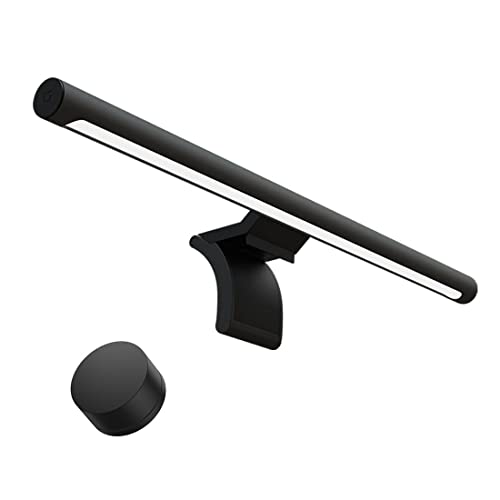
Best for a minimal desk where the hardware should disappear
- Metal body with a magnetic rotating mount
- 2.4GHz wireless remote
- Adjustable color temperature 2700K to 6500K
- High color rendering for reading and paperwork
Why buy it: the magnetic rotating mount lets you angle the throw precisely, which matters more than most spec-sheet numbers.

Best for a second desk, a student setup or trying the format
- Touch controls on the bar itself
- Auto-dimming to match room light
- No-glare asymmetric throw
- Very light, clips on without tools
Why buy it: the cheapest way to find out whether a light bar fixes your desk, and for a lot of people it does.

Quick Comparison
| Product | Best for | Rating | Price | Buy |
|---|---|---|---|---|
| BenQ ScreenBar Halo LED Monitor Light Bar with Wireless Controller | Best Overall | — | Check (paid link) | |
| BenQ ScreenBar Pro LED Monitor Light Bar with Motion Sensor | Best for Ultrawide | — | Check (paid link) | |
| Quntis Monitor Light Bar PRO+ with Remote Control | Best Value | — | Check (paid link) | |
| BenQ ScreenBar Plus with Desktop Dial | Best Physical Control | — | Check (paid link) | |
| XIAOMI Mi Computer Monitor Light Bar with Wireless Control | Best Looking | — | Check (paid link) | |
| Quntis Computer Monitor Lamp with Auto-Dimming and Touch Control | Best Budget | — | Check (paid link) |
The Light Bars, Reviewed
1. BenQ ScreenBar Halo — Best Overall
Covered above. What owners consistently praise: the backlight, the desktop controller, even coverage with no reflection on the screen, and auto-dimming that actually works. Recurring complaints: price; a clip that suits a specific bezel thickness range; a coin-cell controller; and insufficient spread on ultrawide displays. Check price (paid link).
2. BenQ ScreenBar Pro — Best for Ultrawide
The Pro exists because ultrawide monitors broke the format. An 18-inch bar centered on a 34-inch display lights the middle of the desk beautifully and leaves your keyboard’s outer thirds in shadow. The Pro widens the throw to cover the desk in front of a wide or curved screen, and adds a motion sensor that brings it up when you sit down — a small thing that owners mention often, because a light you never switch on is a light you do not benefit from. USB-C power rather than USB-A fits modern docks better.
Recurring complaints: the most expensive on the page; the motion sensor can trigger from passing movement in a shared room; and it is physically longer, which needs clearance if you run a monitor arm or a webcam on the same bezel. Check price (paid link).
3. Quntis Monitor Light Bar PRO+ — Best Value
This is the model that makes the BenQ premium a genuine question rather than a foregone conclusion. It fits curved as well as flat monitors, it auto-dims against an ambient sensor, and — the important part — it ships with a wireless remote rather than expecting you to reach over the screen. Optically it does the core job: asymmetric throw, no reflection on the display, adjustable brightness and color temperature.
Recurring complaints: the light is slightly less even across its length than the BenQ bars, with a visible falloff at the ends; there is no rear backlight; and the build is plastic where the premium bars use aluminum. For roughly a third of the price it covers most of the benefit. Check price (paid link).
4. BenQ ScreenBar Plus — Best Physical Control
The Plus is the older BenQ design and it survives on one merit: the desktop dial. It is a weighted metal knob you turn for brightness and press for color temperature, and it is the control scheme people who use these things for eight hours a day consistently prefer. No hunting for a capacitive strip, no remote to lose, no menu. Optically it is the same proven asymmetric design with ambient auto-dimming.
Recurring complaints: the dial is wired to the bar, so there is a cable running across your desk — the single most common criticism; there is no backlight; and it is now priced awkwardly close to the Halo. Buy it specifically for the dial. Check price (paid link).
5. Xiaomi Mi Computer Monitor Light Bar — Best Looking
The Xiaomi is the design-led option and it earns that description honestly: an anodized metal body, a magnetic mount that lets the bar rotate to fine-tune the angle of throw, and a small 2.4GHz remote. The rotating magnetic mount is more practically useful than it sounds — being able to tilt the bar a few degrees is how you eliminate the last trace of reflection on a glossy screen or push more light toward a keyboard rather than a notepad.
Recurring complaints: no ambient auto-dimming, so you adjust it yourself as the room changes; the remote is small enough to lose; and there are several similar-looking listings of different generations, so check which version you are buying. Check price (paid link).
6. Quntis Computer Monitor Lamp — Best Budget
Around $40, touch controls on the bar, auto-dimming, and the same asymmetric no-glare optics as everything else here. It is the sensible way to find out whether the format solves your problem before spending $180, and for a lot of people it turns out to be all they needed — a second desk, a home-office setup used a few hours a week, or a student.
Recurring complaints: the touch controls mean reaching over the monitor, which is the thing everyone who upgrades cites as their reason; the light is less even than the premium bars; and the clip is lighter, so it can shift if you knock the monitor. Check price (paid link).

What Owners Actually Complain About
Monitor light bar reviews are unusually consistent, and four themes cover almost all the negatives.
The clip does not fit my monitor. The most common single complaint, and it is a measurement problem. These mounts are counterweighted hooks designed for a bezel of a specific thickness — typically somewhere between about 0.4 and 1.2 inches. Very thin modern bezels and very thick older displays both cause trouble, as do monitors with a rear curve near the top edge. Measure your top bezel before ordering.
Not bright enough on a big desk. Almost always an ultrawide monitor with a standard-length bar. The light falls off toward the ends and the outer thirds of the desk stay dim. Buy a model specified for wide displays if your screen is 34 inches or more.
Reaching over the monitor to adjust it. The reason remotes and desktop dials exist, and the single clearest predictor of whether someone upgrades within a year. If you adjust brightness more than occasionally, pay for the separate controller.
It turns off with the monitor. A consequence of drawing power from the display’s USB port, which on many monitors goes dead in standby. Some people consider that ideal. If you want the bar independent of the screen, run it from a powered hub or a wall charger instead.
How to Choose a Monitor Light Bar
Four checks, in order. Measure the top bezel and confirm it falls inside the mount’s stated range — this decides whether the product works at all. Measure the screen width: above 34 inches, buy a wide-throw model. Decide how you want to control it: touch strip on the bar is cheapest and most annoying, remote is the middle ground, weighted desktop dial is the nicest. Decide whether you work in a dark room: if you do, the backlight on the Halo is the feature worth paying for.
One spec worth ignoring: quoted lux at a fixed distance, which is measured directly under the center of the bar and tells you nothing about evenness across the desk. Two specs worth insisting on: an asymmetric optical design with a stated no-glare claim, and adjustable color temperature — an evening session at 2700K is a very different experience from one at 6500K.
The Verdict
The BenQ ScreenBar Halo is the monitor light bar the owner-review record supports, and the backlight is the reason rather than the brand — lifting the wall behind a bright screen addresses the contrast that causes most of the discomfort people blame on the display. On an ultrawide, buy the ScreenBar Pro instead, because a standard bar simply will not cover the desk. And if you want to find out whether this format helps you at all, the Quntis PRO+ at around $70 answers that question honestly. Check price on Amazon → (paid link)
Related: best desk lamps for eye strain · the full desk lamp roundup · how many lumens does a desk lamp need? · sun lamps and light therapy · the indoor lighting hub · how we rank.