 Garden
Affiliate Disclosure
Some links on this page are affiliate links. As an Amazon Associate, we earn from qualifying purchases — at no extra cost to you. We do not buy, test, or physically handle the products we cover; our rankings come from aggregated owner reviews, ratings and expert consensus. Commissions never change our verdicts. How we rank · full disclosure.
An indoor camera is a different purchase from an outdoor one, and the difference is not weatherproofing. A camera on your driveway records a public-facing space and the people who choose to walk up it. A camera in your living room records you, your family, your guests and anyone who works in your home — and if it is a cloud camera, a company is holding all of that. That is not an argument against indoor cameras. It is an argument for choosing one on where the video goes, not on which one has the most megapixels.
The good news is that the honest choice is also the cheap one. Local-storage cameras with on-device detection now cost less than the cloud-first models and rate just as well, which was not true three years ago. Here are the six the owner-review record supports.
Top Picks at a Glance
Where does the video actually go?
This is the first question and most buyers never ask it. Indoor cameras fall into three groups and they behave completely differently in the situations that matter.
| Model | Storage | Detection runs | Cost after purchase |
|---|---|---|---|
| Tapo C211 | MicroSD in the camera | On the device | None |
| eufy S350 | Local, optional encrypted cloud | On the device | None required |
| Ring Indoor Cam | Cloud only | In the cloud | Plan required to record |
| Wyze Cam v4 | MicroSD, cloud optional | Device or cloud | None for local recording |
| Blink Mini 2K+ | Sync Module local, or cloud | Cloud for person alerts | Module once, or a plan |
| Nest Cam Indoor | Cloud, 3 hours free | On the device | Free tier is usable |
The column that matters most indoors is the second one. A camera that writes to a card in its own body has an attack surface roughly the size of your home network. A camera that streams to a data center has an attack surface that includes the company, its staff and everyone who has ever obtained a copy of your reused password.
Our #1 Pick: Tapo C211
The C211 is the camera we would put in a friend's living room, and the reasoning is not complicated. It shoots 2K, it pans and tilts to cover a whole room from one corner, the person and pet detection runs on the camera rather than on someone else's servers, and it writes everything to a microSD card that stays in your house. There is no plan, no tier and nothing that stops working. Owner ratings are among the highest in the category and the review volume behind them is large enough to be meaningful.
The feature that separates it from cheaper pan-and-tilt cameras is the privacy mode. Switch it on and the lens physically rotates to face into the camera body. That is a visible, mechanical state you can confirm from across the room, which is worth considerably more than a software toggle promising the same thing. For a camera that lives in a space people actually occupy, being able to see that it is off is the whole argument.
The complaints are the ordinary ones for the class. It needs 2.4GHz Wi-Fi and, like most cameras, dislikes mesh networks that publish one name for both bands. The motor is audible when it pans, which surprises people who put it in a bedroom for a baby monitor. And the microSD card is the part that fails — buy a high-endurance card rated for continuous surveillance writing, not a spare from a phone.
Check price on Amazon → (paid link)
The Ranked Field

Best for almost everyone — a sharp, cheap camera that records to its own card with no plan
- 2K resolution with 360-degree pan and vertical tilt
- MicroSD recording in the camera, no subscription required
- On-device person, pet and motion detection
- Physical privacy mode that rotates the lens into the housing
Why buy it: the rare product where the cheapest sensible option is also the one we would recommend to a friend — it records locally, the detection runs on the camera, and the lens physically turns away when you switch privacy mode on.
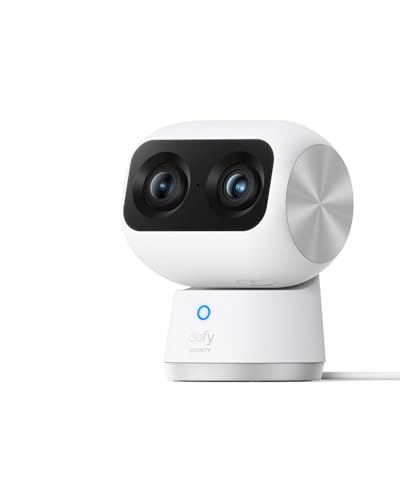
Best for a large open-plan room where you want detail as well as coverage
- Two cameras: a wide 4K sensor plus a telephoto for 8× zoom
- Local storage with optional encrypted cloud, never mandatory
- On-device AI tracking that follows a moving subject
- Full 360-degree pan with vertical tilt
Why buy it: the dual-camera arrangement solves the fundamental indoor problem — a wide lens shows you that someone is in the room, and the second lens is what lets you see who.

Best for households already running Ring doorbells and alarms who want one app
- The highest owner rating in this roundup
- Plug-in, tiny footprint, sits on a shelf anywhere
- Manual privacy cover on current models
- Recording requires a Ring Home plan
Why buy it: the smoothest experience if your house is already on Ring, with two honest caveats: recordings need a paid plan, and the company settled with the FTC in 2023 over employee access to customer video — see the privacy section below.

Best for putting several cameras around a house without spending real money
- 2.5K resolution with color night vision
- MicroSD recording, including continuous recording, with no plan
- IP65 rated so it can also go outside under cover
- Optional cloud plan for AI events, not required for basic recording
Why buy it: the price is the feature. Wyze remains the cheapest route to covering four or five rooms, and continuous local recording to a card is included rather than sold back to you.

Best for a single room, set up in five minutes, in an Alexa household
- 2K video from a plug-in body the size of a matchbox
- Alexa integration and Echo Show live view
- Local storage via a Blink Sync Module, or a cloud plan
- Person detection on the paid tier
Why buy it: the least effort of anything here. It is the camera to buy for a parent who wants to check on a dog and has no interest in configuring anything.

Best for households built around Google Home, Nest displays and Android
- 2K video with on-device intelligence
- Three hours of event history included with no subscription
- Person, animal and vehicle alerts without a plan
- Native Google Home and Nest Hub integration
Why buy it: the only major cloud-first camera that gives you something usable for free — a rolling three hours of event history, which is genuinely enough to check what a noise was.
Quick Comparison
| Product | Best for | Rating | Price | Buy |
|---|---|---|---|---|
| Tapo 2K Pan/Tilt Security Camera C211, Motion Detection, Two-Way Audio, Night Vision | Best Overall | — | Check (paid link) | |
| eufy Security 4K Indoor Cam S350, Dual Cameras, 8× Zoom, 360° Coverage, No Subscription | Best Local Storage | — | Check (paid link) | |
| Ring Indoor Cam, Home or Business Security in 1080p HD Video, White | Best in the Ring Ecosystem | — | Check (paid link) | |
| WYZE Cam v4, 2.5K AI Security Camera, Indoor/Outdoor, Color Night Vision | Best Budget | — | Check (paid link) | |
| Blink Mini 2K+ Plug-in Indoor Security Camera, 2K Video, Night Vision | Best Plug-In Simplicity | — | Check (paid link) | |
| Google Nest Cam Indoor (Wired, 3rd Gen), 2K Video, Color Night Vision | Best for Google Homes | — | Check (paid link) |
The privacy question, stated plainly
An indoor camera is the highest-stakes camera you will own, so the record here matters. In May 2023 the Federal Trade Commission announced a settlement requiring Ring to pay $5.8 million and to implement a comprehensive privacy and security program, over allegations that employees and contractors had accessed customers' private videos and that inadequate security practices had allowed attackers to take over customer cameras through credential stuffing. Ring has since made two-factor authentication mandatory and introduced end-to-end encryption as an option. We still list the Ring Indoor Cam, because it is a well-made camera with an exceptional owner rating and many households are already committed to the ecosystem — but the settlement is public record and belongs in the decision rather than in a footnote. FTC press release on the Ring settlement.
The general lesson is not that one company is uniquely untrustworthy. It is that any cloud camera creates a copy of your home life that other people can potentially reach, and the way to reduce that risk is structural rather than a matter of picking a nicer brand. Choose local storage where you can. Where you use cloud, turn on end-to-end encryption if the brand offers it.
Audio is legally different from video, and this is where indoor cameras get people into trouble. Federal law permits recording a conversation where one party consents, and most states follow that rule — but a meaningful number require the consent of every party. An always-on microphone in a living room, recording conversations between guests who have consented to nothing, is precisely the scenario those laws contemplate. The Reporters Committee for Freedom of the Press publishes a state-by-state guide and the Department of Justice sets out the federal position. Check your state, and remember that every camera here lets you turn the microphone off. We are describing the landscape; talk to a lawyer for your situation.
Three settings, whichever camera you buy: a unique password you have used nowhere else, two-factor authentication on the account, and motion or activity zones that exclude anywhere you would not want recorded.
Where to put one, and where not to
The useful principle is that a camera belongs where a visitor would already expect to be seen. In practice:
- Entry hall or front door interior — the single most valuable position, because it captures a face at conversational distance and in usable light.
- Main living space, aimed at the entry — covers the room without pointing at where people relax.
- Back door, mud room, garage interior door — the second entry point, which is the one that gets used.
- Stairs or a hallway — a bottleneck that anyone moving through the house has to pass.
- Never bedrooms or bathrooms, and never in a space a tenant, housemate or care worker has a reasonable expectation of privacy in.
Avoid pointing a camera through a window: the glass reflects the infrared illuminators at night and you get a bright white haze rather than a picture. If you need to see the yard, use an outdoor camera — the picks are in our outdoor camera roundup, and the same logic applies to positioning covered in where to place security cameras.

How We Rank
We never buy, install or physically handle these cameras. Rankings come from aggregated owner ratings across the most-owned indoor cameras, weighted toward longer-ownership reviews where app changes, subscription shifts and hardware failures appear, and cross-checked against published specifications. Four things carry the weight: where recordings are stored and who can reach them, which we treat as the primary criterion indoors; usable image quality in ordinary domestic lighting rather than headline resolution; alert reliability, since a camera that cries wolf gets muted; and total cost including any plan required to make the camera do its job. Prices were checked at the time of writing. Full method: how we rank.
What Owners Actually Complain About
Notification delay. The most-repeated gripe across every brand: an alert that arrives forty seconds after the event. Some of that is the cloud round trip, some is phone battery optimization silently throttling the app. Whitelist the app from battery saving before concluding the camera is faulty.
MicroSD cards dying. Cameras rewrite the same card constantly and consumer cards are not designed for it. A card that fails silently means no footage on the day you need it. Buy high-endurance and check the recordings occasionally.
Features moving behind a paywall. Several brands have shifted person detection, longer clips or rich notifications into a plan after launch. It is the strongest practical argument for choosing a camera whose detection runs on the device.
Two-band Wi-Fi confusion. Most of these cameras are 2.4GHz only, and modern routers that broadcast one name for both bands cause setup failures that read as broken hardware. Temporarily splitting the bands during setup fixes it.
Night vision through windows. Not a defect. Infrared bounces off glass. Move the camera or use one outside.
The Verdict
Buy the Tapo C211. It costs less than a takeaway dinner, records 2K locally with no plan, runs its detection on the device, and physically turns its lens away when you tell it to — which is the single most reassuring feature available on an indoor camera. Step up to the eufy S350 if you have a large room and want to identify faces at distance rather than just see that someone is there.
Take the Ring Indoor Cam if your home is already on Ring and you accept both the plan cost and the company's privacy history, and the Nest Cam if you are a Google household and value the free event history. The Wyze Cam v4 remains the way to cover several rooms cheaply, and the Blink Mini 2K+ is the one to buy for someone who will never open a settings menu. Check price on Amazon → (paid link)
More from this hub: Smart Home & Security · Best home security cameras · Best cameras for apartments · Do cameras record all the time? · How much data do cameras use? · How we rank