 Garden
Affiliate Disclosure
Some links on this page are affiliate links. As an Amazon Associate, we earn from qualifying purchases — at no extra cost to you. We do not buy, test, or physically handle the products we cover; our rankings come from aggregated owner reviews, ratings and expert consensus. Commissions never change our verdicts. How we rank · full disclosure.
The short version: after weighing six no-fee options on what genuinely works without a subscription, how footage is stored, what happens in an outage and what long-term owners report, our #1 pick is the eufy Security 5-Piece Home Alarm Kit. It is the only mainstream alarm system where nothing important sits behind a paywall — the siren, the app alerts, the full event history and local camera recording all work forever for the price of the box.
Read this before anything else. Removing the monthly fee removes exactly one thing: the person who calls the police. Every system here will make noise and send a notification. None of them will dispatch anyone. That is a perfectly reasonable trade for many households, and a bad one for some — the section below is the honest version of that decision.
Top Picks at a Glance
What "No Monthly Fee" Actually Means
A subscription in this category bundles several different things together, and it helps to separate them, because only one of them is genuinely impossible to replace.
| What a plan usually includes | Available free? | How |
|---|---|---|
| Video recording and playback | Yes | microSD card, base station or NVR drive |
| Motion and person detection | Usually | On-device AI on most current models |
| Push alerts to your phone | Yes | Standard on every system here |
| Event history and timeline | Yes | Stored locally |
| Siren and local response | Yes | Built into the hub or camera |
| Off-site backup of footage | Partly | Only with some cloud tier |
| Cellular backup for the alarm | Rarely | Almost always plan-gated |
| A person who calls the police | No | This is what the fee actually buys |
Two rows deserve a second look. Cellular backup is usually tied to a plan even on no-fee-friendly brands, which means a self-monitored system reaching the outside world only over your broadband stops reporting when the router loses power or the line is cut — a well-known way to defeat a connected alarm. A local siren still sounds, which is most of the deterrent value, but be clear-eyed that nothing leaves the property.
And professional monitoring is the genuine trade. Asleep, on a flight, in a meeting or out of signal, a self-monitored alarm is a notification sitting unread on a locked phone. If that scenario is the reason you are buying a security system, pay the fee — our best home security systems roundup compares the monitored options on three-year cost.
The Money, Over Three and Five Years
This is why people search for this page, so here it is plainly.
| Setup | Hardware | Monthly | 3-year total | 5-year total |
|---|---|---|---|---|
| eufy 5-Piece alarm, self-monitored | ~$180 | $0 | ~$180 | ~$180 |
| eufyCam S330 4-camera kit | ~$550 | $0 | ~$550 | ~$550 |
| REOLINK 4-camera PoE system | ~$400 | $0 | ~$400 | ~$400 |
| Mainstream kit on a $10 plan | ~$250 | $10 | ~$610 | ~$850 |
| Mainstream kit on a $22 plan | ~$260 | $22 | ~$1,050 | ~$1,580 |
| Installed system on a $40 plan | financed | $40 | ~$1,440+ | ~$2,400+ |
Note that the no-fee columns do not move. That is the whole point: the cost is the purchase, and after that the system is simply yours. Over a decade in one house the difference against a mid-tier plan runs to several thousand dollars.
Our #1 Pick: eufy Security 5-Piece Home Alarm Kit
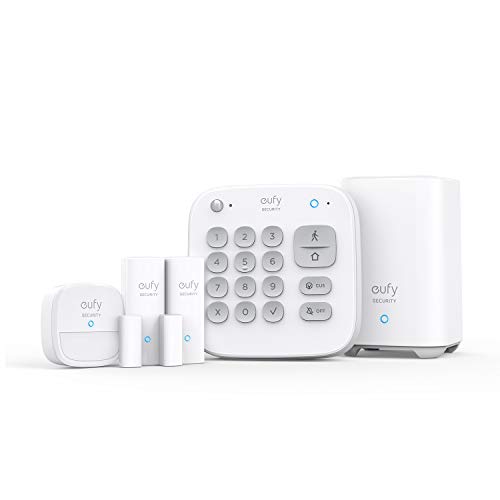
eufy is the only mainstream brand that treats the subscription as genuinely optional rather than as the business model. The HomeBase hub, keypad, motion sensor and two entry sensors give you a real alarm: open a protected door while armed and the siren sounds and your phone lights up, with the full event history stored locally and available forever. Add eufy cameras later and their footage records to the same HomeBase, still with no plan.
Owners consistently report that the appeal is exactly this absence of friction. Reviewers who moved from a subscription system describe the relief of not being upsold at every screen, and the fact that the hardware they bought still does everything it did on day one two years later. It is also expandable in the direction most households actually grow — a no-subscription video doorbell, a couple of cameras, a smart lock, all on one hub.
Consensus Score ████████░░ 8.5
The complaints are fair. Five pieces is a small kit — most homes need more sensors, and the real spend is higher than the headline. The optional professional monitoring is newer and less proven than Ring’s or SimpliSafe’s, with fewer reviews describing an actual dispatch. Integration outside eufy is limited, so it does not become a general smart home hub. And the HomeBase must stay near the router on power, which constrains where it can live. eufy has also faced criticism over past cloud and privacy handling, which is worth reading up on if local-only is the reason you are here.
Check price on Amazon → (paid link)
Best No-Fee Security Systems 2026: The Ranked Field
Best for a real door-and-window alarm with nothing behind a paywall
- HomeBase hub, keypad, motion sensor and 2 entry sensors
- Every core alarm function works with no subscription
- Expands with eufy cameras, doorbells and locks on the same hub
- Optional professional monitoring only if you want it later
Why buy it: the only mainstream alarm system where nothing important is gated behind a plan — the siren, the app, the history, all free forever.

Best for covering the outside of a house with zero recurring cost
- Four 4K cameras with integrated solar charging
- 16 GB local storage in the HomeBase 3, expandable with your own drive
- On-device face and person recognition, no cloud needed
- HomeBase 3 also runs eufy sensors and locks
Why buy it: four 4K cameras that charge themselves and record to storage you own — the highest up-front price here and the lowest lifetime one.

Best for continuous 24/7 recording with no internet dependency at all
- Four 4K PoE bullet cameras and an 8-channel NVR with a 2TB drive
- One cable per camera carries both power and video
- Continuous recording, roughly two to three weeks on the included drive
- Works entirely offline — internet only adds remote viewing
Why buy it: the only setup here that records every second rather than motion clips, and it does it without touching a cloud service.

Best for seeing packages on the step as well as faces at the door
- Dual cameras — head-to-toe view plus a dedicated package view
- 2K resolution with 8 GB local storage on board
- No subscription for recording, alerts or history
- Battery or existing doorbell wiring
Why buy it: the package camera is the feature people actually use daily, and none of it costs a monthly fee.

Best for adding a fourth or fifth camera cheaply
- 2.5K QHD with color night vision
- Records to a microSD card with no plan
- Built-in spotlight and siren
- Indoor or outdoor with a suitable power run
Why buy it: nothing near this price records 2.5K in color at night to a card you own.

Best for a shed, fence or rental where nothing can be wired
- Up to two years on two AA lithium cells
- 1080p with infrared night view
- Local storage to a USB drive via Sync Module 2
- Person detection available on a paid tier
Why buy it: two years between battery changes, and a USB drive instead of a subscription.
Quick Comparison
| Product | Best for | Rating | Price | Buy |
|---|---|---|---|---|
| eufy Security 5-Piece Home Alarm Kit with HomeBase | Best Overall | — | Check (paid link) | |
| eufy Security eufyCam S330 (eufyCam 3) 4-Camera Kit | Best No-Fee Camera System | — | Check (paid link) | |
| REOLINK 8CH 4K PoE Security Camera System with 2TB HDD, RLK8-800B4 | Best Wired System | — | Check (paid link) | |
| eufy Security Video Doorbell E340 with Dual Cameras | Best No-Fee Doorbell | — | Check (paid link) | |
| WYZE Cam v4 2.5K Indoor/Outdoor Security Camera | Best Budget Camera | — | Check (paid link) | |
| Blink Outdoor 4 Wireless Security Camera | Best Set-and-Forget Camera | — | Check (paid link) |
Where the Footage Lives
| System | Storage | Recording style | Survives internet outage? |
|---|---|---|---|
| eufy 5-Piece Alarm Kit | HomeBase, local | Sensor events; video with eufy cams | Yes — siren and local log |
| eufyCam S330 4-Cam Kit | 16 GB in HomeBase 3, expandable | Motion events, 4K | Yes |
| REOLINK RLK8-800B4 PoE | 2 TB NVR drive | Continuous 24/7 | Yes — fully independent |
| eufy Video Doorbell E340 | 8 GB on board | Motion and press events | Yes, records; no remote view |
| WYZE Cam v4 | microSD | Motion events or continuous | Yes, records; no remote view |
| Blink Outdoor 4 | USB drive via Sync Module 2 | Motion clips | Yes, records locally |
How We Rank
We never buy, install or physically handle the products on this site, and we say so on every ranking page. Rankings come from aggregated owner reviews, star ratings, review volume, manufacturer specifications and published expert consensus. For no-fee systems we weight four things: what genuinely works without paying, checked against the free-tier documentation rather than the marketing; where footage is stored and how much; outage behavior; and whether the vendor has a history of moving features behind a paywall after launch, which is the specific risk of buying into a no-fee promise. Full method on how we rank.
The Systems, Reviewed
1. eufy 5-Piece Home Alarm Kit — Best Overall
Covered above. What owners like: nothing paywalled, local history, easy expansion within eufy, and hardware that still does everything two years on. What they complain about: a small starter kit, unproven optional monitoring, limited third-party integration, and a hub tied to the router. Check price (paid link).
2. eufyCam S330 (eufyCam 3) 4-Camera Kit — Best No-Fee Camera System
The strongest no-fee answer for households that want to see the outside of the house rather than sense the inside. Four 4K cameras with integrated solar panels keep themselves charged, and the HomeBase 3 stores footage on 16 GB of built-in storage that you can expand with your own drive. Recognition runs on the device rather than in a cloud.
Consensus Score ████████░░ 8.2
Recurring complaints: the highest up-front price here. Solar output falls sharply in northern winters and in shaded mounting spots, and owners in those situations end up recharging by hand. eufy’s past handling of cloud uploads and privacy has drawn justified criticism. And cameras are not sensors — this kit will never tell you a door opened.
3. REOLINK 8CH 4K PoE System — Best Wired System
The most genuinely independent setup on this page. Four PoE cameras run one Ethernet cable each to an 8-channel NVR with a 2 TB drive, and the whole thing records continuously — every second, not just motion clips — with the internet unplugged. Roughly two to three weeks of continuous 4K footage fits on the included drive with H.265 compression, and far longer on motion recording. Our full PoE camera system guide covers the wiring in detail.
Consensus Score ████████░░ 8.6
Recurring complaints: the install is the real cost — pulling Cat6 through an attic is a weekend, and through finished two-story walls it is an installer job. The NVR is a single point of failure and a theft target, so hide it. The app is capable but less polished than the mass-market brands. And there are four more channels than cameras, which is either headroom or an upsell depending on your view.
4. eufy Video Doorbell E340 — Best No-Fee Doorbell
Two cameras: one for a head-to-toe view of whoever is at the door, one aimed down at the step for packages. 2K resolution, 8 GB of on-board storage, and no subscription for recording, alerts or history. It runs on battery or on existing doorbell wiring.
Consensus Score ████████░░ 8.3
Recurring complaints: the package camera has a narrow useful range and needs careful mounting height to frame the step properly. Battery life drops considerably on a busy street. Some owners report the chime setup is more fiddly than Ring’s. And it is another eufy-ecosystem device, which compounds if you already have concerns about the brand.
5. WYZE Cam v4 — Best Budget Camera
2.5K with color night vision, a spotlight, a siren and microSD recording, at a price that normally buys a basic 1080p camera. It is the standard recommendation for adding a fourth or fifth angle without adding meaningful cost.
Consensus Score ████████░░ 8.1
Recurring complaints: outdoor use needs a suitable power run and a sheltered position. Wyze’s cloud and app have drawn criticism after past security incidents, which is a fair thing to weigh for a camera in your home. Some smart detection features are subscription-gated even though recording is not. And microSD cards do wear out under continuous recording — buy a high-endurance card.
6. Blink Outdoor 4 — Best Set-and-Forget Camera
Two AA lithium cells and up to two years of standby means an outdoor camera you install and then forget about. Local storage works via a Sync Module 2 and a USB drive, so no subscription is needed for footage.
Consensus Score ███████░░░ 7.9
Recurring complaints: the two-year figure assumes light activity and drops sharply facing a busy sidewalk. Night footage is infrared monochrome, so it detects rather than identifies. The Sync Module 2 and USB drive are extra purchases. And person detection sits behind a Blink subscription, which undercuts the no-fee positioning.
Building a No-Fee System That Actually Works
A sensible no-fee setup is usually a combination rather than one product. The pattern that works for most homes: an alarm kit for the doors and windows, so you know the moment an entry point opens; a doorbell camera, because the front door is where most interactions happen; and one or two outdoor cameras on the driveway and the back approach. That is roughly $400 to $600 once, against $600 to $1,600 over five years for a subscription equivalent.
Three practical rules make it hold up. Hide the recorder — a base station or NVR next to the front door defeats the purpose of local storage. Buy high-endurance microSD cards, because ordinary cards fail under constant rewriting and fail silently. And check the free tier in writing before you buy, because the specific risk of this category is a vendor moving a feature behind a paywall after launch; that risk is lowest on hardware that stores footage on a drive you physically own.
Related reading: using a security camera without a subscription, what the subscriptions actually cost, and how long cameras store footage.
The Verdict
For a genuine alarm with nothing paywalled, buy the eufy 5-Piece Home Alarm Kit and add sensors to match your doors and windows. If you want cameras rather than sensors, the eufyCam S330 kit is the best no-fee outdoor system and the REOLINK PoE system is the best if you want continuous recording and total independence from the internet. Add the eufy E340 doorbell at the front door, and fill gaps with Wyze Cam v4 or Blink Outdoor 4. And if, having read the trade-off, you would rather someone called the police, pay the fee — that is a legitimate answer too. Check price on Amazon → (paid link)
More from this hub: Smart Home & Security · Best home security systems · Best DIY systems · Best systems for renters · Compare products side by side · How we rank